
AI for back-office work: a practical guide
In short: AI for back-office work means an AI agent reads e-mails, PDFs and forms, understands the case, records it in your ERP or CRM and only hands the exceptions to a person. It pays off most for recurring cases such as inbox triage, order entry, master data maintenance, complaints and follow-ups. What decides success is not the tool but clear approval rules: what may the agent do on its own, what does it only prepare, and who checks by sampling?
In many mid-sized companies the biggest time sink is neither production nor sales but the work in between: inside sales, order processing, purchasing, administration. The same things happen there every day: open the e-mail, read the attachment, retype the data, create the record, send a confirmation, set a reminder. This is exactly the kind of work AI agents can handle well today, because it consists of documents, rules and system entries.
Yet back-office work rarely tops the surveys. According to Bitkom, Germany's digital industry association, a majority of German companies with 20 or more employees use AI for the first time: 57 percent in 2026, mostly in customer contact (72 percent) and marketing and communication (54 percent). Controlling and accounting reached 25 percent, internal knowledge management 22 percent. No user exploits the potential fully, and 59 percent say they don't exploit it at all. KfW Research names finding the first practical applications as a central obstacle for small and mid-sized firms. For the back office that is easy to solve: the use cases are sitting in the inbox.
What does AI for back-office work actually mean?
Back-office work is rule-based case handling: an input (e-mail, PDF, form, call) is checked, assigned to a case, recorded in a system and closed with a reply or a follow-up task. An AI agent adds three things classic software could not do:
- Understanding unstructured input: an order written as free text in an e-mail, a scanned delivery note, a complaint with a photo. The agent recognises what it is about, even when every document looks different.
- Acting in the system: it creates the order in the ERP, updates master data, sets the follow-up in the CRM and writes the confirmation, through connected interfaces and with its own restricted permissions.
- Recognising exceptions: if information is missing, a price doesn't match or a customer is blocked, it stops and passes the case to a person, with a reason.
The difference from a chatbot: a chatbot answers questions; an agent completes cases. More on the distinction in Agentic AI vs. chatbots.
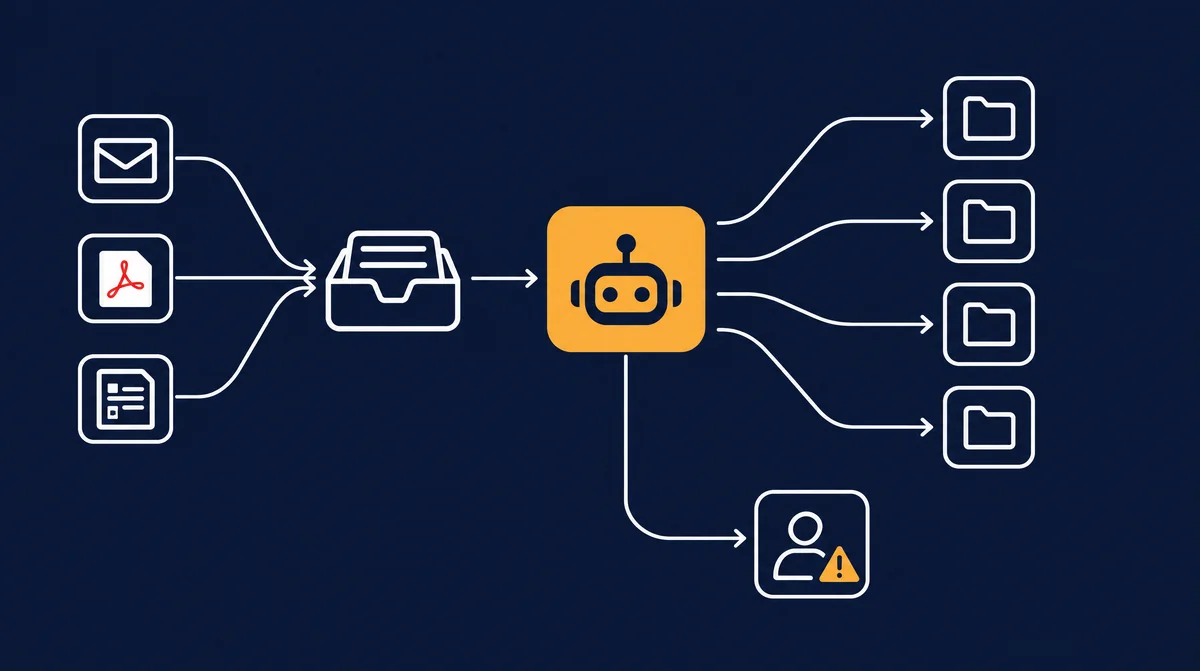
Eight typical back-office tasks and what an AI agent takes over
It makes sense not to assess "the back office" as a whole but each task on its own. The level applies to the task, not to the whole position. The table shows typical levels for a mid-sized manufacturer or distributor; yours may differ.
| Task | What the AI agent does | Typical level |
|---|---|---|
| Inbox triage and routing | Reads shared mailboxes, recognises the request type (order, enquiry, invoice, complaint, application), matches customer and case, routes it. | Fully AI |
| Order entry from e-mail and PDF | Extracts items, quantities, dates and delivery address, checks them against master data and price list, creates the order, sends the order confirmation. | Fully AI for standard cases, AI + human for deviations |
| Master data maintenance | Applies address and contact changes, finds duplicates, fills missing fields with a source. | AI + human (bank details always with call-back confirmation) |
| Preparing purchase orders | Checks minimum stock, requests quotes, compares price, delivery time and payment terms, drafts the purchase proposal. | AI + human |
| Logging complaints | Acknowledges receipt the same day, requests photos and receipts, links order and product, opens the case with a deadline. | Fully AI for intake, human for resolution and goodwill |
| Deadlines and follow-ups | Tracks deadlines from contracts, quotes and complaints, reminds, follows up and escalates when overdue. | Fully AI |
| Drafting correspondence | Writes replies, reminders, shipping notices and queries in your company's tone, referencing the case. | Fully AI for standard replies, AI + human for anything with commitments |
| Filing and archiving | Names, tags and files documents in the right place, links them to the case, makes them searchable. | Fully AI |
What is missing from the table stays with people: goodwill, negotiation, special terms, conflicts between customers, decisions with legal effect. That is exactly what your back-office staff will have more time for.
AI agent, RPA or workflow tool: what's the difference?
Many companies already automate parts of the back office: macros, workflow rules in the ERP or robotic process automation (RPA), software robots that imitate clicks. These tools are not obsolete, but they have a clear limit: they need structured input.
| Feature | Classic RPA / workflow | Chatbot | AI agent in the back office |
|---|---|---|---|
| Input | Fixed formats, fixed fields | Questions in a dialogue | Free text, PDF, scan, form, e-mail thread |
| How it works | Fixed click sequence | Answers, doesn't act | Understands, decides within rules, acts in the system |
| On deviations | Stops or processes wrongly | Answers anyway | Recognises the exception and escalates it with a reason |
| Maintenance | Every layout change needs an update | Maintain the knowledge base | Maintain rules and examples; layout changes usually uncritical |
| Typical use | Stable high-volume processes with clean data | Information, FAQ | Cases with varying documents and judgement limits |
In practice the two complement each other: the agent reads and understands, an existing interface or ERP workflow does the posting. If you already run RPA, you don't have to replace it; you can put the agent in front of it.
Which AI specialist for which back-office role?
A general-purpose assistant told to "just handle the orders" fails on the details. It works better when each role in the org chart is staffed with a specialist modelled on a real job profile, bringing expertise, working rules, checklists, limits and a fixed approval rule. In the mysoftwarelab specialist pool, these profiles matter most for the back office, all at the "standard operation" tier, meaning approval according to fixed rules, thresholds and sampling:
- Order processing clerk: enters orders only with an unambiguous purchase order, checks item, quantity, price, date and credit limit, always sends a confirmation. Price or date commitments outside the rules and larger cancellations go to a human.
- Purchaser: requests at least three quotes above a set value, orders only from approved suppliers, documents the comparison. Does not negotiate or sign.
- Complaints manager: acknowledges every complaint the same day, requests photos and receipts, reports recurring faults to quality. No goodwill or refund decisions, no legal assessment of warranty.
- Warehouse administrator: works only with stock from the system, checks minimum stock and goods receipt against order. Orders only within the approved range, writes nothing off without approval.
- Dispatcher: plans deliveries against capacity and informs customers of delays immediately. Conflicts between customers are resolved by people.
- Executive assistant: sorts e-mails, prepares documents and works on the principle "draft instead of send".
- Data protection coordinator: keeps an eye on access-request deadlines and checks that a data processing agreement exists for every provider. Does not replace the data protection officer.
- Knowledge manager: answers internal questions from manuals and contracts, every answer with a source.
Incoming invoices, payment matching and dunning often belong to accounting; what makes sense there is covered in AI in accounting. You can browse all specialists with their checklists and limits on the specialist pool and positions page.
Exception handling and approval rules: the core
Whether AI for back-office work succeeds is decided not by the standard case but by the exceptions. An agent that gets 95 percent right and silently mis-posts the other 5 percent is worse than none. An agent that recognises its own uncertainty and escalates the case with a reason is a real colleague. These rules have proven themselves:
- Thresholds: orders, purchase orders or credit notes above an amount always go for approval. You set the amount, not the agent.
- Hard stops: changed bank details, blocked customer, credit limit exceeded, unknown item, price outside the price list. Never posted automatically.
- Disclose uncertainty: if the agent can't read a field unambiguously, it flags it instead of guessing.
- Sampling: correctly completed cases are also checked at fixed rates, high at first, lowered later based on results.
- Four-eyes principle for external impact: whatever is legally binding or costs money is approved by a person.
- Escalation paths: every exception has a named recipient and a deadline. If it sits too long, it escalates.
In the company cockpit you see these exceptions as an approval list per role: case, reason, the agent's proposal, a button to approve or correct. How to set up approval levels properly is explained in Steering and approving AI agents.
Step by step: introducing AI in the back office
- Map roles in the org chart: inside sales, order processing, purchasing, warehouse, administration, reception. Include tasks someone does "on the side". The method is described in Org chart with AI agents.
- List and count tasks per role: how many orders, complaints, enquiries per week? How long does one take on average?
- Collect inputs: 50 to 100 real examples per task, including the difficult ones. They show how differently your customers write.
- Set the level: fully AI, AI + human or human, per task. Plus thresholds, hard stops and sampling rate.
- Choose specialists and connect systems: which specialist takes the role? What read and write permissions does it get in ERP, CRM, document management and mailbox? As few as possible, as many as necessary.
- Shadow mode: for two to four weeks the agent works alongside without posting. Your team compares its proposals with their own work.
- Release step by step: standard cases first, then further case groups. Lower the sampling rate based on results.
- Measure continuously: cycle time, exception rate, correction rate, monthly in the cockpit.
Sample calculation: order entry from e-mails
This is a sample calculation with disclosed, assumed values, not customer data. Assume your back office receives 60 orders a day by e-mail or PDF and manual entry takes 6 minutes on average. That is 360 minutes, or 6 hours a day.
Assumptions with an AI agent: 80 percent of orders are standard cases the agent records; a person spends 1 minute on average on sampling or review. 20 percent are exceptions that still take 6 minutes. Result: 48 × 1 + 12 × 6 = 120 minutes. Under these assumptions, 6 hours become 2; 4 hours a day are freed up for queries, customer care and special cases.
The calculation stands or falls with the exception rate. At 40 instead of 20 percent, the relief shrinks considerably. That is why shadow mode with real inputs matters: it gives you your actual rate instead of an estimate. With mysoftwarelab, AI API costs run through your own accounts, so they can be traced per case.
Which metrics show whether it works?
| Metric | What it measures | What to watch |
|---|---|---|
| Cycle time | Time from input to completed case (e.g. to order confirmation) | Measure standard cases and exceptions separately. Long waiting times for exceptions point to missing ownership. |
| Exception rate | Share of cases the agent hands to a person | Break down by reason. Frequent reasons are often master data gaps you fix once. |
| Correction rate | Share of automatically completed cases that had to be corrected afterwards | The key quality metric. It determines how far you may lower sampling. |
| Hours freed | Processing time saved per role and week | Offset against time for approvals and sampling, or the picture looks too rosy. |
| Customer queries | How often customers follow up because of errors or confusion | Early warning if external quality suffers. |
Skills shortage: relief for the back office
According to the IAB Establishment Panel 2024 of Germany's Institute for Employment Research, more than 80 percent of establishments expect personnel problems; in 2010 this applied to fewer than one in two. In the back office this rarely shows up as a vacancy but as a backlog: orders pile up, follow-ups are forgotten, holiday cover doesn't work. AI agents help exactly there, because they absorb peaks and don't go on holiday or call in sick.
Fraunhofer IAO rightly points to a downside: removing routine tasks can intensify the demands on people. Whoever only handles exceptions has a more demanding working day. So plan what the role will look like: more customer contact, more clarification, responsibility for the agent. Bitkom's figures show that employee acceptance is an obstacle for 42 percent of companies using AI. Involve the team early; they know the exceptions best. In Germany, if AI systems are capable of monitoring employees' performance or behaviour, an existing works council generally has co-determination rights. Get employment-law advice for your specific case.
Data protection, processing agreements and audit-proof logs
Back-office work means personal data: names, addresses, order histories, sometimes bank details. For implementation:
- Data processing agreements: with every provider processing data on your behalf (AI provider, hosting) you need a contract under Art. 28 GDPR. Prefer providers processing in the EU.
- Data minimisation: the agent only gets the permissions and data its role requires.
- No automated individual decisions with legal effect: Art. 22 GDPR sets tight limits here. Another reason why goodwill, rejections and similar decisions belong with people.
- Logs: every step of the agent is stored traceably: input, recognised data, rule, action, approval by whom and when. This helps with customer queries, audits and troubleshooting.
- Retention: if the agent files business correspondence or accounting-relevant documents, statutory retention and record-keeping rules (in Germany, for tax-relevant records, the GoBD) still apply. Align this with your tax adviser.
How to run AI in a GDPR-compliant way while keeping control of your data is covered in Sovereign AI and GDPR for mid-sized companies. This section is not legal advice.
Example: the back office at mysoftwarelab
mysoftwarelab uses the model itself. In its own org chart, inside sales and phone are staffed "fully AI": enquiries are received, assigned, answered or scheduled as appointments, and only special cases reach a person. Overall, AI agents from the company's own cockpit do around 80 percent of the work. Sales, by contrast, is deliberately AI + human: people hold the conversations, agents prepare them.
Frequently asked questions about AI for back-office work
What can AI take over in the back office today?
Above all, recurring document-based tasks: triaging the inbox, entering orders from e-mails and PDFs, maintaining master data, logging complaints, preparing purchase orders, tracking deadlines, drafting replies and filing documents. Decisions involving judgement or legal effect stay with people.
Will an AI clerk replace my employees?
Usually not. The agent handles the standard case; people handle exceptions, look after customer relationships and own the approvals. Especially when staff are scarce, this creates breathing room without losing know-how.
What is the difference between an AI agent and RPA in the back office?
RPA repeats fixed click sequences and needs structured input. An AI agent understands unstructured documents such as free-text e-mails or scans, acts in the system within rules and recognises exceptions. The two can be combined.
How reliable is AI document processing?
As reliable as the rules around it. Thresholds, hard stops, sampling and complete logs ensure errors are caught before they cause damage. Measure the correction rate and only lower sampling once it stays low.
Which systems do I need to connect?
Typically the e-mail mailbox, ERP or inventory system, CRM and document management. The agent gets its own accounts with restricted permissions, not a person's login.
Can an AI administrative assistant be GDPR-compliant?
Yes, if data processing agreements are in place, data is processed in the EU where possible, the agent has only the permissions it needs and decisions with legal effect stay with people. Involve your data protection officer for your specific case.
How long does implementation take?
That depends on systems and tasks. For the first task, plan two to four weeks of shadow mode before the agent posts on its own. Further tasks follow step by step.
Conclusion: the back office is the underrated lever
AI for back-office work has an effect where mid-sized companies have the most routine every day: in the inbox, order processing, purchasing and filing. Success doesn't depend on the model but on three things: assess tasks one by one, choose the right specialist with clear limits for each role, and steer exceptions with fixed approval rules in the cockpit. Then the agent takes the standard case and your team takes care of what needs experience.
AI for back-office work
Which back-office tasks could an AI agent take over in your company?
Callback within 24 hours. Then you go through your org chart role by role with Andreas Indorf and see a clickable prototype of your cockpit with approvals for your back office.
Request a callback → Browse the specialist poolSources
- Bitkom: Erstmals nutzt die Mehrheit der Unternehmen KI (press release, 14 Sept 2026, German)
- KfW Research, Fokus Volkswirtschaft No. 554: Künstliche Intelligenz im Mittelstand (July 2026, German)
- IAB-Kurzbericht 7/2025: IAB Establishment Panel 2024, more than eight in ten establishments expect personnel problems (German)
- Fraunhofer IAO: Designing AI technology, work and processes together. Implementing AI in clerical work sustainably (German)
- Regulation (EU) 2016/679 (GDPR), EUR-Lex
Who builds your company cockpit
Benefit from over 20 years of enterprise experience
Andreas Indorf
Managing Director, mysoftwarelab GmbH
Qualification: Founder of mysoftwarelab GmbH; with his team, builds company cockpits with AI agents for SMEs
Expertise: Over 20 years of developing and implementing IT systems for DAX companies and international corporations. Specialized in AI automation for mid-sized businesses since 2021.
Hands-on Experience: As a model operation, mysoftwarelab already runs 80% of its own IT services through AI. This hands-on experience flows directly into our client consulting.
Focus: Company cockpits in which AI agents take over recurring tasks – for companies with 5+ employees, built and run by us.
E-E-A-T Proof: All information complies with Google's E-E-A-T guidelines (Experience, Expertise, Authoritativeness, Trustworthiness) for high-quality consulting content.
Which of your tasks belong in the cockpit?
In a free callback we clarify whether a company cockpit with AI agents fits your business – for companies with 5+ employees.
- An individual company cockpit instead of single AI tools
- AI agents take over recurring tasks, your team approves
- Built and run by us – individual offer
From the lab
The most important AI news of the week – as a comic.
Every Wednesday, ByteUndGlitch explains one real AI story in eight panels. Satirical, accessible, free.
Read the latest episode