
Org Chart with AI Agents: Decide Role by Role
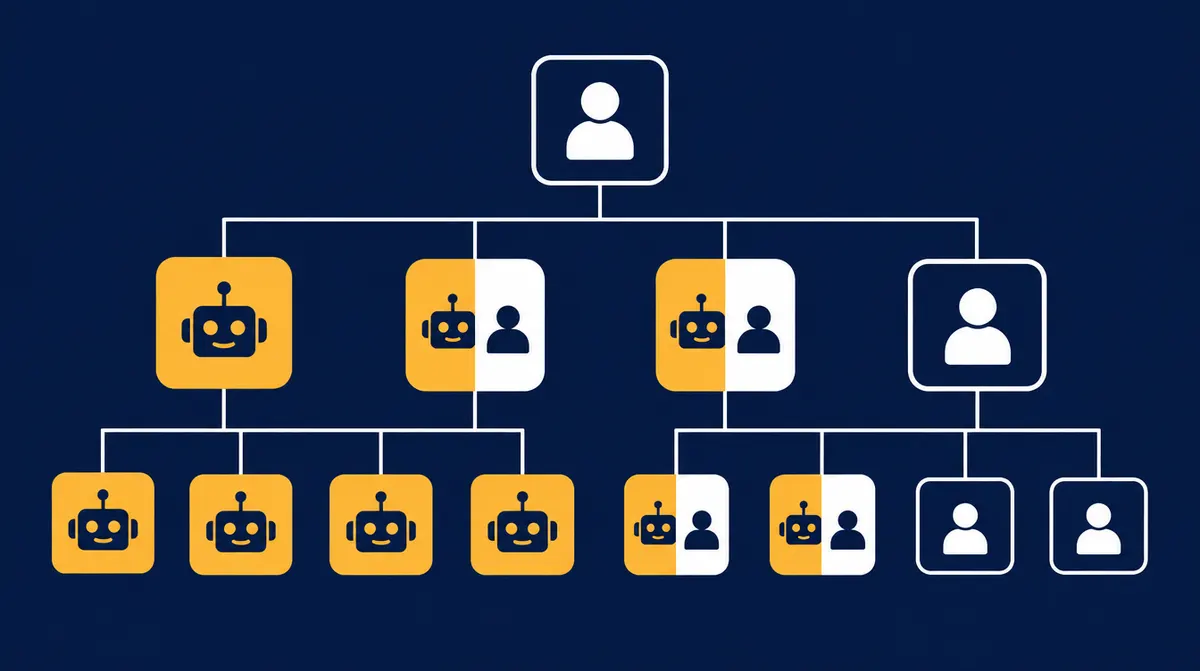
In short: An org chart with AI agents shows for every position which tasks AI takes over fully, where AI prepares and a human decides – and what stays with people. You don't go department by department but task by task. The result is a picture of your company in which it is clear who does what: people, agents or both together.
In most companies the org chart is a forgotten document: created once, rarely updated. Yet it is the best tool for introducing AI sensibly. According to KfW Research, the biggest hurdle is not technology but the question of where to start – identifying first practical applications is a central obstacle, especially alongside daily business. The org chart answers that question systematically: it makes you look at every position and every task once.
Why the org chart is the right starting point for AI
- Completeness: whoever searches for "use cases" finds the three obvious ones and misses the rest. Whoever walks through the org chart sees every task.
- Responsibility: every AI agent gets a place in the structure – and with it a person who leads and approves it.
- Clarity: management, department heads and works council talk about positions and tasks, not models and interfaces.
- Measurability: hours and costs can be quantified per position – the basis for any honest ROI calculation.
The three levels: fully AI, AI + human, human
| Level | What it means | When it fits |
|---|---|---|
| Fully AI | An agent does the task on its own and only hands exceptions to a person. | High repetition, clear rules, errors can be corrected (e.g. answering calls, status updates, booking appointments). |
| AI + human | The agent prepares, the human reviews, edits and approves. | The result goes outside or has financial consequences (e.g. quotes, invoices, orders). |
| Human | The task stays with a person; agents at most supply information. | Trust, negotiation, responsibility, personnel decisions, production. |
Important: the level applies to the task, not the whole position. Accounting can have receipts captured fully by AI while keeping payment approvals human. A position is therefore usually "partially AI".
Step by step: creating your org chart with AI agents
- Capture positions: all roles, including vacant ones and those the boss covers "on the side". Mark external roles such as tax advisor or lawyer as external.
- List tasks per position: what actually happens there every week? Five to ten tasks per position are enough for a first pass.
- Classify each task: fully AI, AI + human or human – using the five questions below.
- Quantify effort: hours per week per task. This shows which position gains most.
- Assign owners: for every agent, a person who steers, spot-checks and handles exceptions.
- Set the order: start with the position under the most pressure today – not the technically most exciting one.
Five questions per task
- Does the task occur at least weekly?
- Does it follow recognisable patterns?
- Is the needed information available digitally (e-mail, CRM, ERP, documents)?
- Is an error visible and correctable before damage occurs?
- Does the result need the trust or responsibility of a person?
Four yeses and no on question 5: fully AI. One no on 1–4 or yes on 5: AI + human. Several noes: human. The rule is deliberately simple – it doesn't replace analysis, but gives you a solid first draft in an hour.
Example: mysoftwarelab's own org chart
mysoftwarelab uses the model itself. Around 80% of our own work is done by AI agents steered from our own cockpit:
| Position | Status | Note |
|---|---|---|
| Management | Human | Decides; agents supply reports |
| Back office / phone | Fully AI | Calls, inquiries, appointments |
| Marketing | Fully AI | Content, campaigns, reporting |
| Support / knowledge | Fully AI | Answers from the knowledge base |
| Sales: setters and closers | AI + human | People run the conversations; agents research leads, build prototypes, calculate ROI |
| Development, project management | Human (AI-supported) | Employees and freelancers |
| Coaching & training | Human | Enabling client teams |
| Tax advice, legal | External | Stays with external experts |
Note: sales is deliberately not fully AI. Conversations that build trust are led by people – the agents make sure those people only have to lead conversations.
Common mistakes
- Classifying whole departments: "accounting is AI" is never entirely true. Assess tasks.
- Agents without owners: an agent without a responsible person stops being checked after three months.
- Leaving processes unchanged: putting AI on old processes automates detours. See the AI paradox.
- Starting with the most exciting case: the first agent should relieve, not impress.
- Not involving the team: the people doing the task today know where the exceptions are.
From org chart to cockpit
An org chart on paper changes nothing. In the company cockpit with AI agents it becomes the working interface: every position with agents is visible there with its tasks, approvals and results. At mysoftwarelab we prepare the org chart before the first meeting based on your website; in the meeting you decide role by role directly in it. Typical tasks per position: AI agents in the company cockpit.
FAQ: org chart with AI agents
What is an org chart with AI agents?
An org chart showing for each position which tasks AI agents take over fully, where AI prepares and a human decides, and what stays human.
Which positions can AI agents take over fully?
Most often reception/phone, back office, sales support and knowledge management. Most other positions are partially AI: the agent prepares, the human decides.
How long does it take?
A first draft with the five questions takes a few hours. A robust task analysis with hours and costs per position takes about two weeks at mysoftwarelab.
Does the works council need to be involved?
In Germany, if AI systems can monitor employees' performance or behaviour, the works council usually has co-determination rights. Involve it early – the org chart is a good basis for the conversation. Seek legal advice for individual cases.
Conclusion: structure first, then technology
AI becomes effective in SMEs when it is clear which task it takes over and who leads it. The org chart provides exactly that clarity – position by position, task by task.
Org chart with AI agents
Your org chart with AI agents – prepared before the first meeting.
Callback within 24 hours. Then you go through your org chart role by role with Andreas Indorf – with a clickable prototype of your cockpit.
Request a callback → See positionsSources
Who builds your company cockpit
Benefit from over 20 years of enterprise experience
Andreas Indorf
Managing Director, mysoftwarelab GmbH
Qualification: Founder of mysoftwarelab GmbH; with his team, builds company cockpits with AI agents for SMEs
Expertise: Over 20 years of developing and implementing IT systems for DAX companies and international corporations. Specialized in AI automation for mid-sized businesses since 2021.
Hands-on Experience: As a model operation, mysoftwarelab already runs 80% of its own IT services through AI. This hands-on experience flows directly into our client consulting.
Focus: Company cockpits in which AI agents take over recurring tasks – for companies with 5+ employees, built and run by us.
E-E-A-T Proof: All information complies with Google's E-E-A-T guidelines (Experience, Expertise, Authoritativeness, Trustworthiness) for high-quality consulting content.
Which of your tasks belong in the cockpit?
In a free callback we clarify whether a company cockpit with AI agents fits your business – for companies with 5+ employees.
- An individual company cockpit instead of single AI tools
- AI agents take over recurring tasks, your team approves
- Built and run by us – fixed monthly price
From the lab
The most important AI news of the week – as a comic.
Every Wednesday, ByteUndGlitch explains one real AI story in eight panels. Satirical, accessible, free.
Read the latest episode