

AI in Accounting: What AI Takes Over and What Not
In short: AI in accounting pays off most in receipt capture, account coding suggestions, invoice checking, dunning and the preparation of payroll and the month-end close. Payments, payroll runs and anything tax-related stay in human hands: the AI prepares, your team or your tax advisor approves. What matters is classifying the accounting role task by task and documenting every AI step so it is traceable under the German GoBD rules.
In many mid-sized companies, accounting is the role that suffers most from routine: typing up receipts, checking invoices against purchase orders, matching incoming payments, writing reminders, collecting documents for the tax advisor. At the same time it is a role where mistakes cost money and the tax authority reads along. That combination is exactly what makes the question interesting: what can AI really take over here, and where may it only prepare?
The shift is measurable. According to the German digital association Bitkom, 57 % of companies with 20 or more employees used AI in 2026, a majority for the first time. In controlling and accounting, 25 % of companies use it, up from 17 % the year before. That is less than in customer contact or marketing, but the increase shows that accounting is now on the list. The real obstacle is named by KfW Research: companies struggle to identify their first practical applications. For accounting, that question can be answered very concretely once you break the role down into its tasks.
What AI in accounting can do today
Modern AI agents read receipts even when they are laid out differently, suggest accounts and cost centres, compare invoices with purchase orders and delivery notes, match bank statement lines to open items and draft reminders in the tone you specify. What is new compared to classic text recognition is that an agent understands context: it recognises that an invoice belongs to a framework agreement with a supplier, that the bank details have changed since the last invoice, or that the same invoice has arrived for the second time.
What AI should not do: move money, make tax decisions, settle valuation questions at closing or grant goodwill. That boundary is not a technical one but an organisational one. You set it for each task individually.
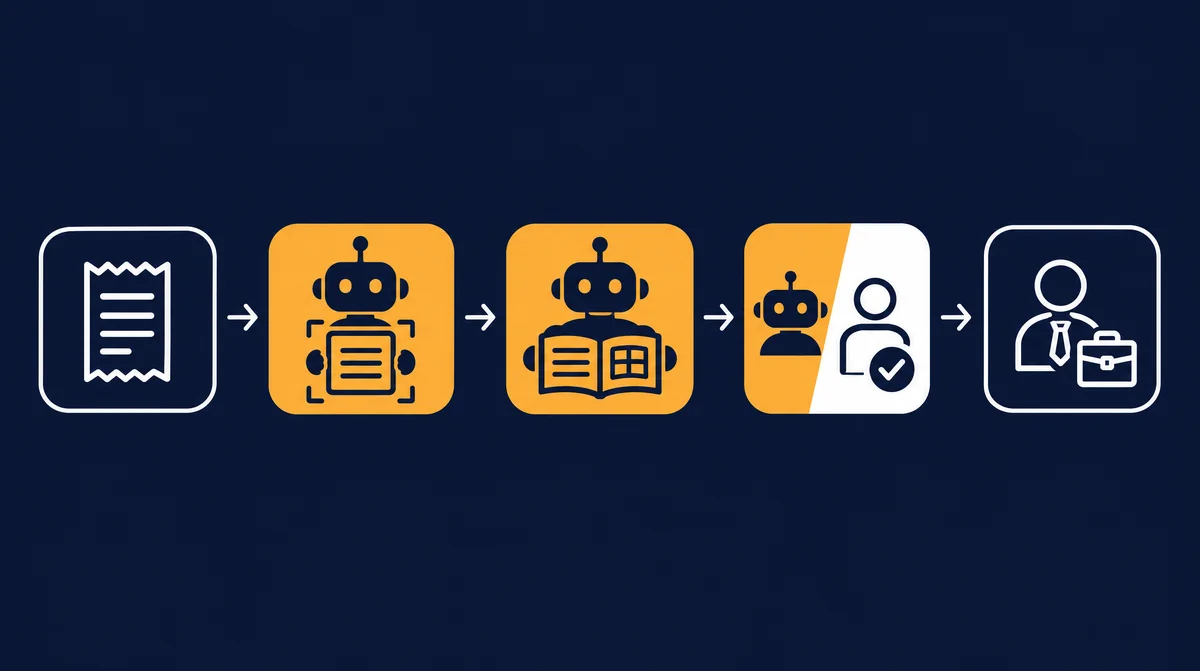
Accounting in the org chart: classified task by task
"AI does the accounting now" is never true. What makes sense is a classification per task, as described in the org chart with AI agents: fully AI, AI + human (AI prepares, a human approves), human or external. The table below is a typical starting point for a company with its own bookkeeping and an external tax advisor. Your classification may differ, for example if you outsource payroll completely.
| Task | Typical level | What the AI does | What stays with people |
|---|---|---|---|
| Receipt capture | Fully AI | Read receipts from inbox, scans and e-invoices, check mandatory details, detect duplicates | Resolve illegible or incomplete receipts |
| Account coding suggestion | AI + human | Suggest account, cost centre and tax code, with reasoning | Approve new suppliers, special cases and spot checks |
| Invoice checking (accounts payable) | AI + human | Match invoice against order and delivery note, flag price and quantity differences | Resolve differences with purchasing or the supplier |
| Payment proposals | AI + human | Determine due dates and discount periods, prepare the payment proposal | Release payments, always under the four-eyes principle |
| Dunning (accounts receivable) | Fully AI up to level 1, then AI + human | Match incoming payments, send payment reminders, prepare higher dunning levels | Dunning from level 2, deferrals, goodwill, collection |
| Payroll preparation | AI + human | Collect hours, absences, joiners and leavers, month-on-month comparison per person | Approve payroll run and filings (payroll team or tax office) |
| Month-end close preparation | AI + human | Reconcile bank and open items, request missing receipts, suggest accruals | Decide closing entries and valuation questions |
| Reports | Fully AI (as draft) | Open items list, liquidity overview, comments on variances to last month | Draw conclusions, make decisions |
| Tax returns, VAT returns, annual accounts | External | Hand over complete and organised documents | Tax advisor advises, prepares and is responsible |
Notice that only two tasks run without any approval, and even those only within clear rules. Most are "AI + human". That is not a weakness but the normal case in an area with financial consequences. The gain comes from your team no longer capturing and searching, but checking and deciding.
The right specialists: bookkeeper and payroll accountant
Instead of telling a general-purpose agent to "do the accounting", you choose a trained AI specialist for each role from the specialist pool, based on a real job profile. Each one brings expertise, working rules, checklists, fixed limits and an approval rule. Two specialists are central for accounting, both in "standard operation": approvals follow fixed rules, thresholds and spot checks.
Bookkeeper (payables and receivables)
- Job: Captures receipts, matches payments and prepares dunning runs.
- Expertise: receipt capture and account assignment; payment matching, discounts, due dates; dunning according to your levels.
- Working rules: Detect and stop duplicate invoices. Never accept changed bank details without call-back confirmation. Dunning tone as you specify.
- Checklist: mandatory invoice details, invoice against order and delivery note, due dates and discount periods.
- Limits: Does not release payments. No goodwill or deferral decisions. Suspected fraud goes to a human immediately.
- Approval: Your team approves payments and dunning from level 2.
Payroll accountant
- Job: Prepares the monthly payroll.
- Expertise: wage types, supplements and benefits in kind; social security, wage tax, mini-job rules; deadlines for filings and contribution statements.
- Working rules: Change master data only with evidence. Explain deviations from the previous month. Personnel data only in the approved system.
- Checklist: month-on-month comparison per employee; joiners, leavers, sickness, holidays, parental leave recorded; hours and supplements plausible.
- Limits: No tax or legal advice for employees. Never triggers a payroll run or payment itself. Special cases such as garnishments or severance go to a human.
- Approval: Payroll runs and filings are always approved by your payroll team or tax office.
This is what AI payroll and AI bookkeeping look like in practice: the specialist does the preparation, a person carries the responsibility. The pool also contains a financial accountant for closing preparation, a controller for reports and a tax assistant (preparatory). The latter is classified as a regulated profession: it prepares documents for your tax advisor and formulates questions rather than answers. Tax advice remains reserved for licensed tax advisors. Payroll data also touches HR; how AI handles sensitive data there is covered in the article on AI in HR. All job profiles with their limits are listed under specialist pool and positions.
Legal framework in Germany: GoBD, e-invoicing and approvals
The following points are orientation as of 29 October 2026, not legal or tax advice. Clarify implementation in your company with your tax advisor.
GoBD: traceability and process documentation
The GoBD are the German tax authority's principles for keeping and retaining books and records electronically. They apply regardless of whether a person or software does the booking. For AI agents this means in practice:
- Traceability: every entry must be traceable from the receipt to the report and back. The agent therefore records for every suggestion which receipt it is based on, which rule was applied and who approved it.
- Immutability: received invoices are kept in their original form. The agent reads them but does not change them. Corrections are new, logged transactions.
- Process documentation (Verfahrensdokumentation): it describes the organisational and technical workflow of your accounting. If an agent captures receipts or suggests account coding, that step with its rules, thresholds and approvals belongs in it. When you change rules, update the documentation.
- Retention: since the Fourth Bureaucracy Relief Act, booking vouchers must be kept for eight instead of ten years. For e-invoices, the GoBD as amended in July 2025 generally allow keeping only the structured data set, provided the human-readable view contains no additional tax-relevant information.
Mandatory B2B e-invoicing in Germany
For supplies between domestic businesses, a staged timetable applies under the Growth Opportunities Act:
- Since 1 January 2025: all businesses must be able to receive e-invoices. An e-invoice is a structured format under EN 16931, such as XRechnung or ZUGFeRD. A plain PDF sent by e-mail is not an e-invoice.
- 2025 and 2026: when issuing, paper invoices and, with the recipient's consent, other electronic formats such as PDF are still allowed.
- 2027: businesses with prior-year turnover above EUR 800,000 must issue e-invoices. Smaller businesses may use the previous formats until the end of 2027. EDI remains possible with the recipient's consent until the end of 2027.
- From 1 January 2028: the issuing obligation applies to all domestic B2B supplies. Exceptions include small-amount invoices up to EUR 250, travel tickets and small businesses under the VAT exemption, which must nevertheless be able to receive e-invoices.
In summer 2026, a trade association proposed in the Bundestag to postpone the 2027 stage to 2028; to our knowledge, this has not been adopted. The Federal Ministry of Finance clarified further practical questions in a third guidance letter dated 15 October 2026, for example on handling errors and correcting invoices. Check the current status before you switch.
For AI in accounting, e-invoicing is an advantage: structured data no longer has to be recognised, only checked. It is important that the agent evaluates the structured part, which the tax authority treats as authoritative, and flags differences from the PDF view.
Payments only with approval: the four-eyes principle
No AI agent should trigger payments on its own. That is the most important rule in any AI-supported accounting. The agent prepares payment proposals; release follows the four-eyes principle, with two people for larger amounts where appropriate. Changed bank details are particularly critical: a classic fraud pattern is a fake invoice or e-mail with a new IBAN. The bookkeeper specialist therefore never accepts changed bank details without a call-back to a known number. How approval levels work in general is described in the article on steering and approving AI agents.
Further points: receipts and payroll data contain personal data. Clarify where AI processing takes place, sign a data processing agreement and restrict access. If the system can track employees' performance, an existing works council generally has to be involved.
Example calculation: how many hours can AI save in accounting?
The following calculation is an example based on assumed values, not a measurement and not a client result. It shows how you can do the maths yourself. Assumptions: a company with 25 employees, part-time in-house bookkeeping, external tax advisor. Per month 300 incoming invoices, 150 outgoing invoices, 25 payslips. The minutes per transaction are estimates you should replace with your own.
| Task | Assumption today | Hours today | Assumption with AI | Hours with AI |
|---|---|---|---|---|
| Receipt capture and coding | 300 receipts × 4 min | 20 | 15 % exceptions × 4 min + 1 h spot checks | 4 |
| Invoice checking against orders | 300 × 3 min | 15 | 20 % differences × 6 min (resolution) | 6 |
| Payment proposals and release | 4 payment runs × 1 h | 4 | Review and release only | 2 |
| Dunning and payment matching | 6 h | 6 | Only level 2+ and special cases | 2 |
| Payroll preparation | 25 people × 15 min | 6 | Only check variances to last month | 3 |
| Month-end close preparation | 10 h | 10 | Reconciliations prepared, decisions remain | 5 |
| Reports | 6 h | 6 | Read and comment on draft | 2 |
| Total per month | 67 | 24 |
In this example, effort drops from 67 to 24 hours a month, around 43 hours. Three caveats: first, the result depends heavily on the exception rate. If your suppliers send messy invoices, it will be higher. Second, the first months require extra hours for rules, testing and fine-tuning. Third, saved time is only worth something if it is used well, for example for receivables management, liquidity planning or relieving a person who does the books "on the side" today. A robust calculation with your real volumes comes from an org chart analysis, which determines the AI potential per role in hours and costs.
Step by step: automating accounting and accounts payable with AI
- List the tasks: write down what actually happens in accounting every week, including what management does itself.
- Gather volumes and times: receipts per month, payslips, dunning cases, minutes per transaction. Two weeks of rough notes are enough.
- Classify each task: fully AI, AI + human, human or external. Use the table above as a starting point.
- Define approval rules: amount limits, spot-check rate, four-eyes principle for payments, handling of changed bank details.
- Involve your tax advisor: agree on data format, handover timing and which preparation actually helps them.
- Update the process documentation: describe what the agent does, by which rules and who approves.
- Start with one task: usually receipt capture or invoice checking. Only add the next task once spot checks are stable.
- Review regularly: look at exception rate, errors and approval times monthly and refine the rules.
Common mistakes with AI in accounting
- Letting the agent pay: not even small amounts. Payments are where a mistake turns into damage.
- No process documentation: AI capture is running but nobody has described how. That will come up at the latest in a tax audit.
- Accepting coding suggestions unchecked: especially with new suppliers and unusual receipts, spot checks are needed. A good hit rate is no guarantee.
- Processing PDFs instead of e-invoices: reading PDFs when the supplier sends an XRechnung wastes accuracy and risks discrepancies with the authoritative data set.
- Delegating tax questions to AI: an agent can draft questions for the tax advisor. Answers to tax questions belong with the tax advisor.
- Leaving the accounting team out: the people who book today know the exceptions. Without them, the agent learns the wrong rules.
- Switching everything at once: one task after another. Otherwise you won't know where errors come from.
From specialist to cockpit: steer, approve, monitor
An agent that books somewhere in the background does not build trust. In the company cockpit with AI agents, you see the accounting role with its tasks: which receipts were captured, which coding suggestions await approval, which payment proposals are open and where the agent reported an exception. Approvals are recorded there with name and timestamp, which also supports traceability under the GoBD.
mysoftwarelab works this way itself: around 80 % of its own work is done by AI agents from its own cockpit. Tax advice and legal have deliberately stayed external. For your company, we prepare the org chart based on your website before the first meeting, go through it role by role in the call and then show you a clickable prototype of your individual cockpit.
Frequently asked questions about AI in accounting
What can AI in accounting take over?
AI in accounting mainly takes over receipt capture, account coding suggestions, invoice checking against orders and delivery notes, payment matching, payment reminders and the preparation of payroll, month-end close and reports. A human approves payments, payroll runs and tax decisions.
Will AI replace bookkeepers?
Usually not. The role shifts from capturing to checking, approving and resolving exceptions. In small companies, however, AI can relieve bookkeeping that is currently done on the side to the point where no additional hire is needed.
Is AI bookkeeping GoBD-compliant?
It can be, if every entry is traceable from the receipt, original documents are kept unchanged, approvals are logged and the AI step is described in the process documentation. Responsibility stays with the company.
Can AI handle payroll?
AI can prepare payroll: collect hours, absences and changes and check variances to the previous month. The payroll run and filings are always approved by your payroll team or tax office. Special cases such as garnishments go to a human.
Should an AI agent release payments?
That is not advisable. The agent prepares payment proposals; release follows the four-eyes principle by people. Changed bank details should never be accepted without call-back confirmation.
When does mandatory e-invoicing apply in Germany?
All domestic businesses must be able to receive e-invoices since 1 January 2025. Businesses with prior-year turnover above EUR 800,000 must issue them from 2027, all others from 1 January 2028. Exceptions include small-amount invoices up to EUR 250 and small businesses under the VAT exemption.
Do you still need a tax advisor with AI?
Yes. Tax advice, tax returns and annual accounts remain with the tax advisor. AI makes sure the documents arrive there complete, organised and on time.
Conclusion: let AI capture, decide yourself
AI in accounting delivers most when you don't "automate" the role wholesale but classify it task by task. AI can capture, match and prepare. Paying, deciding and taking responsibility stay with your team and your tax advisor. With clear approval rules, up-to-date process documentation and e-invoices as the data basis, a routine role becomes a review and steering role.
AI in accounting
Your accounting classified task by task, with clear approvals.
Callback within 24 hours. Then you go through your org chart role by role with Andreas Indorf and see a clickable prototype of your cockpit, including bookkeeping and payroll.
Request a callback → Browse the specialist poolSources
- Bitkom, press release of 14 September 2026: For the first time, a majority of companies use AI (German)
- KfW Research, Fokus Volkswirtschaft No. 554: Artificial intelligence in SMEs (July 2026, German)
- IHK Region Stuttgart: e-invoices, transition periods and the EUR 800,000 threshold (German)
- IHK Rhein-Neckar: mandatory e-invoicing for B2B supplies (German)
- IHK Köln: Federal Ministry of Finance letter on e-invoicing of 15 October 2025 (German)
- Ebner Stolz: third Federal Ministry of Finance letter on e-invoicing (15 October 2026, German)
- Bundestag lobby register: proposal for a partial postponement of mandatory e-invoicing (July 2026, German)
- ZDH: publication of the updated GoBD (Ministry of Finance letter of 14 July 2025, German)
- IHK Darmstadt: GoBD and process documentation, webinar handout (September 2025, German)
- IHK Karlsruhe: Fourth Bureaucracy Relief Act, tax changes (German)
Who builds your company cockpit
Benefit from over 20 years of enterprise experience
Andreas Indorf
Managing Director, mysoftwarelab GmbH
Qualification: Founder of mysoftwarelab GmbH; with his team, builds company cockpits with AI agents for SMEs
Expertise: Over 20 years of developing and implementing IT systems for DAX companies and international corporations. Specialized in AI automation for mid-sized businesses since 2021.
Hands-on Experience: As a model operation, mysoftwarelab already runs 80% of its own IT services through AI. This hands-on experience flows directly into our client consulting.
Focus: Company cockpits in which AI agents take over recurring tasks – for companies with 5+ employees, built and run by us.
E-E-A-T Proof: All information complies with Google's E-E-A-T guidelines (Experience, Expertise, Authoritativeness, Trustworthiness) for high-quality consulting content.
Which of your tasks belong in the cockpit?
In a free callback we clarify whether a company cockpit with AI agents fits your business – for companies with 5+ employees.
- An individual company cockpit instead of single AI tools
- AI agents take over recurring tasks, your team approves
- Built and run by us – individual offer
From the lab
The most important AI news of the week – as a comic.
Every Wednesday, ByteUndGlitch explains one real AI story in eight panels. Satirical, accessible, free.
Read the latest episode