
How to Implement AI in a Business: 7-Step Guide
In short: If you want to know how to implement AI in a business, start with your org chart, not with tools: capture every position, list its tasks and decide per task whether AI does it fully, a human approves it or it stays entirely human. Then put numbers on hours and costs, staff the right roles with specialised AI agents, test the result in a clickable prototype and start with the position under the most pressure. That turns a handful of licences into an organisation where it is clear who does what and who approves.
For the first time, a majority of German companies use AI: 57 percent according to Bitkom, up from 36 percent a year earlier and 20 percent two years ago. Yet not a single company surveyed says it uses AI's potential fully, and 59 percent say they don't use it at all. Bitkom president Ralf Wintergerst sums up why: whoever only buys a licence has bought AI but hasn't changed anything yet.
That is where this guide starts. It describes a way to introduce AI in your company that doesn't begin with the tool but with the question KfW Research identifies as a central obstacle for SMEs: where do we even start? The answer is the org chart method in seven steps. You can use it without a service provider; where mysoftwarelab applies it in projects, we say so.
Implementing AI: rolling out a tool or changing the organisation?
Most companies introduce AI as a tool. They hand out ChatGPT or Copilot licences, maybe run a training session, and then everyone is expected to figure out what it's good for. That isn't wrong, but it changes little: the work stays the same, only individual steps get faster. Nobody owns it, nobody measures it, and three months later mainly the tech enthusiasts are still using it.
The alternative is to introduce AI as part of the organisation. AI then gets defined tasks in specific positions, with rules, limits and a person who approves. The difference at a glance:
| Aspect | Tool rollout | Organisational adoption (org chart method) |
|---|---|---|
| Starting point | A product, a licence | Positions and tasks in the org chart |
| Who decides what AI is used for? | Each person individually | The company, task by task |
| Accountability | Unclear | One responsible person per AI agent |
| Quality assurance | Hit or miss | A fixed approval rule per task |
| Measurability | Hardly possible | Hours and costs per position |
| Outcome | Individual steps get faster | Whole tasks move to AI, people decide |
Organisational adoption follows a principle we call "decide instead of work" at mysoftwarelab: AI agents handle recurring work, people review, approve and decide. We explain the basic idea in detail in org chart with AI agents. This article covers the complete implementation path.
How to implement AI in a business in 7 steps: the org chart method
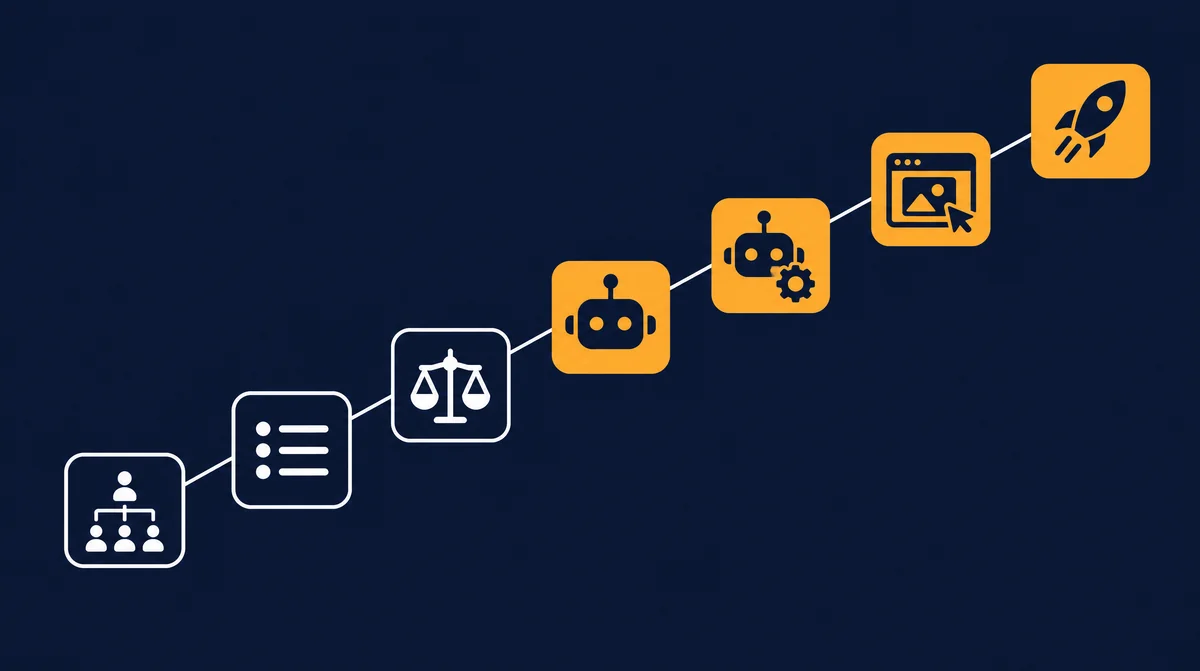
- Capture the org chart, including vacant positions.
- List the tasks of each position.
- Assign a level to each task: fully AI, AI + human, human or external.
- Quantify hours and costs.
- Assign specialists and name owners.
- Review a clickable prototype of the cockpit before investing.
- Start with the position under the most pressure, then expand role by role.
Step 1: Capture the org chart, including vacant roles
Draw your company the way it actually works, not the way the handbook describes it. Include three groups that are often missing: vacant positions (the sales support role that has been advertised for months), side roles (the bookkeeping the managing director does in the evenings) and external roles such as your tax advisor or lawyer. Vacant positions are often the best place to start: nobody is displaced, and the bottleneck is already being felt.
Step 2: List the tasks of each position
For each position, write down five to ten tasks that come up every week. Not "accounting", but "capture incoming invoices", "match payments", "prepare payment reminders". Ask the people who do the work today. They know the exceptions that aren't in any process description.
Step 3: Assign a level to each task
Now every task gets one of four levels. Important: the level applies to the task, not the whole position. Almost every position ends up "partially AI".
| Level | Meaning | Typical tasks |
|---|---|---|
| Fully AI | The AI agent does the task on its own; exceptions go to a person. | Answering calls, booking appointments, status updates, answering questions from the knowledge base |
| AI + human | The agent prepares, the human reviews and approves. | Quotes, payment reminders, monthly reports, job ads |
| Human | The task stays with a person; AI at most supplies information. | Negotiations, personnel decisions, strategy, customer conversations that require trust |
| External | The task sits with a licensed professional outside the company; AI at most prepares documents. | Tax advice, legal advice, audited financial statements |
How approvals work in detail and when spot checks are enough is covered in steering and approving AI agents.
Step 4: Quantify hours and costs
Without numbers, every AI rollout remains guesswork. Estimate the weekly hours per task and apply a fully loaded hourly rate. An example calculation with stated assumptions:
- Assumption: sales support spends 6 hours per week preparing quotes.
- Assumption: 46 working weeks per year, fully loaded hourly rate of 50 euros.
- Calculation: 6 × 46 × 50 = 13,800 euros of working time per year tied up in this one task.
- If the task moves to "AI + human" and, say, one hour per week remains for review, about 5 hours per week are freed up in this example.
Your own numbers will differ. What matters is putting the calculation for all positions side by side. At mysoftwarelab this preliminary stage is called the Company Org Chart Analysis: it determines the AI potential of each role in hours and costs and takes about two weeks.
Step 5: Assign specialists and name owners
A common mistake is the general-purpose agent that is supposed to do "a bit of everything". It works better to staff each role with an AI agent modelled on a real job profile. mysoftwarelab's specialist pool currently covers 51 job profiles. Each specialist comes with expertise, working rules, checklists, limits and a fixed approval rule. Three examples:
| Position | Specialist | Limit | Approval |
|---|---|---|---|
| Reception | Receptionist & phone (standard operation) | No binding commitments on prices or contracts; states at the start that an AI assistant is speaking | Special cases land with the team as a callback |
| Accounting | Bookkeeper, payables & receivables (standard operation) | Never releases payments; never accepts changed bank details without confirmation | The team approves payments and reminders from level 2 upwards |
| HR | HR officer (sensitive field) | No employment-law advice, no automated personnel decisions | A human approves every document addressed to employees |
Specialists fall into three tiers: standard operation (approval by fixed rules, thresholds and spot checks), sensitive field (e.g. HR: preparatory only, always approved by a human) and regulated profession (tax, law, medicine: preparatory only, no advice, approved by the licensed professional). You can browse every profile in the specialist pool and positions.
Just as important: for every agent, name a person who steers it, runs spot checks and handles exceptions. An agent without an owner stops being checked after a few months.
Step 6: Review a clickable prototype before you invest
Before money goes into integration and operation, management should see what the result looks like. A clickable prototype of the company cockpit shows every position with its agents, tasks, approvals and metrics. You, your department heads and, where relevant, the works council can then discuss something concrete instead of slides. What such a cockpit does is described in our guide to the company cockpit with AI agents. At mysoftwarelab, the prototype is built from the first meeting and presented in the second.
Step 7: Start with the position under the most pressure
The first agent should relieve, not impress. Pick the position with the most noticeable bottleneck: missed calls, quotes piling up, a vacant role. Only move to the next role once the first is stable, the approval rules work and the metrics are right. Role by role, you build a company where AI agents handle recurring work and people decide in the cockpit.
Where to start with AI: examples by area
Bitkom's 2026 survey shows where companies actually use AI: above all in customer contact (72 percent of AI users) and in marketing and communication (54 percent). Strong growth came in controlling and accounting (25 percent, up from 17), internal knowledge management (22 percent, up from 11) and sales (14 percent, up from 5). Concrete examples of AI adoption in an SME, translated into tasks and levels:
| Area | Example task | Typical level |
|---|---|---|
| Customer contact | Answer calls, capture requests, book appointments | Fully AI |
| Customer service | Answer e-mail inquiries with a source from the knowledge base | Fully AI, goodwill decisions human |
| Marketing | Posts, newsletters, campaign reports | AI + human |
| Accounting | Capture receipts, match payments, prepare reminder runs | AI + human |
| Knowledge management | Answer questions from manuals and contracts | Fully AI |
| Sales | Research leads, prepare quotes, follow up | AI + human |
| HR | Job ads, structuring applications | AI + human, selection always human |
| Tax and legal | Documents for the tax advisor, flagging contract drafts | External, AI preparatory only |
The biggest obstacles and how the method addresses them
In the Bitkom survey, companies not using AI mainly cite lack of know-how (85 percent), legal uncertainty (66 percent), hard-to-calculate costs (63 percent), lack of staff capacity (51 percent) and no use cases (30 percent). Among companies already using AI, data protection (66 percent), legal uncertainty (56 percent) and employee acceptance (42 percent) top the list. Here is how the org chart method responds:
| Obstacle | Response of the org chart method |
|---|---|
| Lack of know-how | Nobody needs to understand models. The discussion is about positions and tasks everyone in the company knows. The specialist brings its own expertise. |
| Legal uncertainty | Every task has a level and an approval rule. Regulated professions stay with the licensed professional; sensitive fields always have human approval. |
| Hard-to-calculate costs | Hours and costs per position are quantified before investing, and the prototype shows the result in advance. |
| Lack of staff capacity | You start with one position, not a large project. Vacant roles are often the first candidate. |
| No use cases | The complete org chart shows every task. Use cases don't have to be hunted for; they emerge. |
| Data protection | For each task it is clear which data the agent needs. That makes the record of processing activities and processor agreements easier. |
| Employee acceptance | The people doing the work today describe their own tasks and become the owners of their agents. |
Obligations at a glance: AI literacy, GDPR and works council
This section is not legal advice. It shows which topics should be on your list when you introduce AI in your company in the EU, and specifically in Germany (status: October 2026).
- AI literacy (Art. 4 EU AI Act): since 2 February 2025, providers and deployers of AI systems have had to take care of their staff's AI literacy. The Digital Omnibus on AI (Regulation (EU) 2026/1744, in force since 27 July 2026) rewrote Art. 4: companies must take measures to promote AI literacy, without having to guarantee a specific level of competence. The obligation therefore remains. Document target groups, content and participation. Background: the AI literacy obligation under Art. 4.
- Deadlines for high-risk AI: the Digital Omnibus postponed obligations for high-risk systems under Annex III to 2 December 2027. Typical SME agents for phone, accounting or marketing usually don't fall into that category; AI used for selecting job applicants, on the other hand, can be high-risk. Check individual cases.
- GDPR and data processing agreements: if an AI provider processes personal data on your behalf, you need a data processing agreement under Art. 28 GDPR. Add the processing to your record of processing activities and involve your data protection officer early.
- Works council (Germany): under Section 90 of the Works Constitution Act (BetrVG), the works council must be informed in good time about planned work processes "including the use of artificial intelligence". For technical systems that can monitor employees' behaviour or performance, it usually has co-determination rights under Section 87(1) no. 6 BetrVG. The org chart with levels and approvals is a good basis for that conversation.
How long does AI adoption take? An example timeline
The duration depends on company size, data quality and your system landscape. The following timeline is a guide for the first position, not a commitment:
| Week | Phase | Result |
|---|---|---|
| 1 | Capture the org chart, collect tasks (steps 1 and 2) | Complete list of all positions and tasks |
| 1 to 2 | Assign levels, quantify hours and costs (steps 3 and 4) | AI potential per role, with numbers |
| 3 | Assign specialists, name owners, review prototype (steps 5 and 6) | Decision basis for management |
| 4 to 8 | Set up the first position: connect data, configure rules and approvals, train the team | First agent in supervised operation |
| 9 to 12 | Supervised operation with close spot checks, refine rules | Stable approval rate and error rate |
| 13 onwards | Next position, role by role | Gradual expansion in the cockpit |
Roles in the implementation project
- Management: sets the order of positions, decides on investments and signs off the approval rules.
- Project lead: keeps the timeline, collects tasks and numbers and is the first point of contact for the team.
- Process owners per position: describe the tasks, define checklists and become the owners of their agents.
- IT or external provider: connects systems (e-mail, CRM, ERP, phone system) and handles access rights and logging.
- Data protection officer: reviews data flows, processing agreements and the record of processing activities.
- Works council (where one exists): is informed early and involved wherever co-determination applies.
Metrics: how to tell AI adoption is working
- Hours freed per position: planned versus actual, monthly.
- Approval rate: how many drafts does the human approve unchanged? As it rises, spot checks can be reduced.
- Error and correction rate: how often is rework needed, and where?
- Lead time: for example from inquiry to quote, or from receipt to booking.
- Availability and response time: calls answered, time to reply to e-mails.
- AI cost per task: model and API costs relative to the working time freed up.
Common mistakes when introducing AI
- Licences instead of tasks: handing out tools without defining which task changes.
- Classifying whole departments: "accounting now does AI" is never entirely true. Assess tasks.
- General-purpose agent without limits: an agent without a job profile, checklist and approval rule is hard to control.
- Agents without owners: without someone running spot checks, errors creep in.
- Automating old processes: speeding up detours with AI just gives you faster detours. Fix the process before an agent takes it over.
- Starting with the most exciting rather than the most pressing case: the first agent has to bring noticeable relief.
- Involving the team and works council too late: acceptance comes from participation, not from a company-wide e-mail.
Decide instead of work: the model in our own company
mysoftwarelab uses the method itself. Around 80 percent of our own work is done by AI agents from our own cockpit. Back office and phone, marketing, and support and knowledge run fully on AI. In sales, AI and people work together: setters and closers are people, while AI researches leads, builds prototypes and calculates ROI. Development, project management, and coaching and training stay human, supported by AI. Tax advice and legal are external, and management is human. The principle: agents work, people decide.
FAQ: how to implement AI in a business
How do I implement AI in my business?
Start with your org chart rather than a tool. Capture all positions and their tasks, decide per task whether AI does it fully, a human approves it or it stays human, quantify hours and costs, and start with the position under the most pressure.
Where should a company start with AI?
With the position that has the most noticeable bottleneck, such as missed calls, quotes piling up or a vacant role. Common first candidates are reception, customer service, sales support and knowledge management.
How long does AI adoption take in an SME?
Analysing the org chart with hours and costs per role takes about two weeks. Until a first agent runs stably in supervised operation, expect around two to three months depending on your data and systems. After that, you expand role by role.
What legal requirements apply when introducing AI?
Mainly the duty to promote AI literacy under Art. 4 of the EU AI Act, the GDPR with data processing agreements and a record of processing activities, and in Germany the works council's rights under Sections 87 and 90 BetrVG. Seek legal advice for individual cases.
Is it enough to give employees ChatGPT licences?
It can help as a first step but changes little. According to Bitkom, 59 percent of companies don't use AI's potential at all. AI becomes effective when defined tasks in specific positions move to AI with rules, limits and approvals.
Will AI replace employees?
With the org chart method, AI mainly takes over recurring tasks, often in positions that are vacant anyway. People review, approve and decide. Trust, negotiation, personnel decisions and accountability stay human.
Conclusion: organisation first, then the tool
Implementing AI in a business doesn't mean rolling out a product. It means deciding for every task who does it: an AI agent, a person or both together. The org chart makes that decision complete, traceable and measurable. With specialists instead of general-purpose agents, fixed approvals and a cockpit where you steer and monitor, AI adoption becomes a change that holds up role by role. How mysoftwarelab supports companies over the long term is described under AI consulting.
Implementing AI in your business
Your AI adoption, role by role, visible in your own cockpit.
Callback within 24 hours. We prepare your org chart in advance based on your website, go through it with you role by role and then show you a clickable prototype of your cockpit.
Request a callback → Browse the specialist poolSources
- Bitkom, press release of 14 September 2026: For the first time, a majority of companies use AI (German)
- KfW Research, Fokus Volkswirtschaft No. 554: AI in SMEs (July 2026, German)
- EUR-Lex: Regulation (EU) 2026/1744 (Digital Omnibus on AI) of 8 July 2026
- EUR-Lex: Regulation (EU) 2024/1689 (AI Act)
- EUR-Lex: Regulation (EU) 2016/679 (GDPR)
- German Works Constitution Act (BetrVG), Section 90 (German)
- German Works Constitution Act (BetrVG), Section 87 (German)
Who builds your company cockpit
Benefit from over 20 years of enterprise experience
Andreas Indorf
Managing Director, mysoftwarelab GmbH
Qualification: Founder of mysoftwarelab GmbH; with his team, builds company cockpits with AI agents for SMEs
Expertise: Over 20 years of developing and implementing IT systems for DAX companies and international corporations. Specialized in AI automation for mid-sized businesses since 2021.
Hands-on Experience: As a model operation, mysoftwarelab already runs 80% of its own IT services through AI. This hands-on experience flows directly into our client consulting.
Focus: Company cockpits in which AI agents take over recurring tasks – for companies with 5+ employees, built and run by us.
E-E-A-T Proof: All information complies with Google's E-E-A-T guidelines (Experience, Expertise, Authoritativeness, Trustworthiness) for high-quality consulting content.
Which of your tasks belong in the cockpit?
In a free callback we clarify whether a company cockpit with AI agents fits your business – for companies with 5+ employees.
- An individual company cockpit instead of single AI tools
- AI agents take over recurring tasks, your team approves
- Built and run by us – individual offer
From the lab
The most important AI news of the week – as a comic.
Every Wednesday, ByteUndGlitch explains one real AI story in eight panels. Satirical, accessible, free.
Read the latest episode